Discord poker without a bot
To play poker on Discord without a bot, deal a free table in the browser, paste its link in a channel, and talk in a voice channel while you play. Nobody installs anything, the server grants no permissions, and friends who aren’t in the server can join too.
How it looks in your server
SAM Today at 8:02 PM
Turbo table’s up, 4 seats. Hop in voice and grab one: https://www.fizzpoker.com/t/Q7r2Kx9m
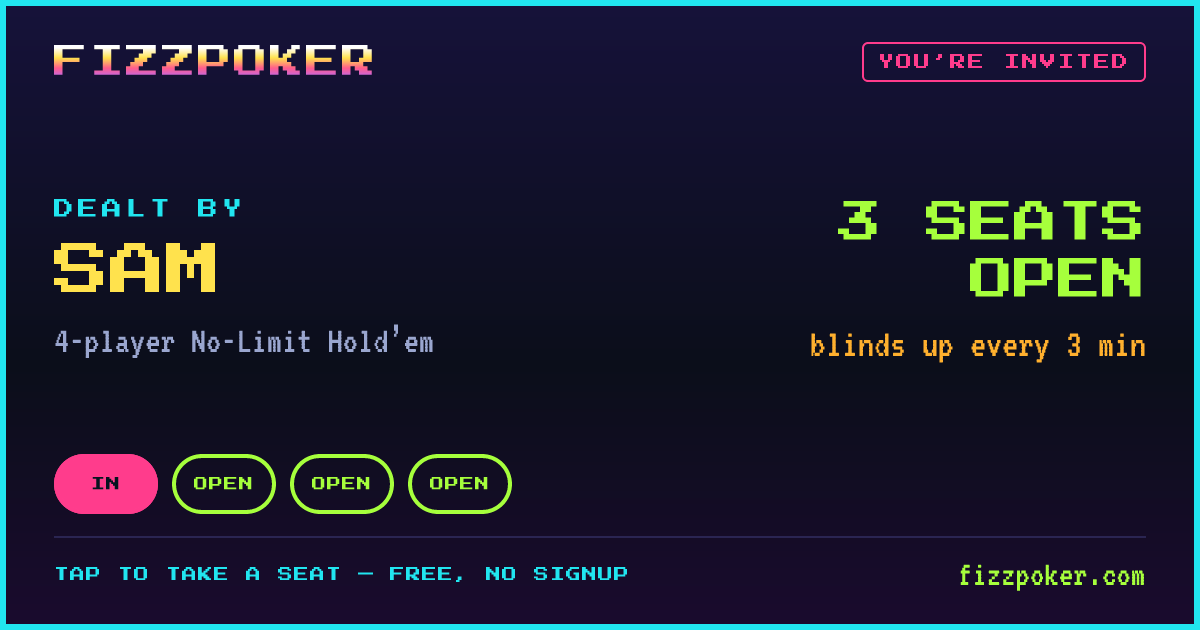
Poker table talk 4 in voice
- Sam
- Maya
- Theo
- Jun
How to run poker night on your server
- Deal a tableOpen FizzPoker, choose 2–9 seats and a blind speed, and create the table. Tables of 2–4 need no account; for 5–9 seats, sign in with a free email link first.
- Paste the link in a channelDrop the private table link into a members-only text channel. Discord turns it into a preview card that anyone can tap.
- Join a voice channelEveryone hops into voice for the table talk. The poker table itself has no voice chat, so Discord handles the banter.
- Sit down and playEach player opens the link in a browser, types a name and takes a seat. The host starts the game from the lobby once everyone is in.
- Run it backWhen someone has won every chip, the host taps Rematch on the results screen: a fresh lobby with the same seats and blinds, and everyone still there moves over. No new link to paste.
That’s the whole setup. Everyone starts with 10,000 chips, the blinds rise every 3, 5, 10 or 15 minutes (turbo, fast, normal or slow — the host picks), and the last player with chips wins. A six-player table typically takes 30–35 min on turbo and 65–90 min on normal — the virtual poker night planner sizes the blinds to your evening.
The link keeps working for the channel, too: while seats are open its preview shows who dealt and how many seats are left, and once the game is over the same link unfurls into the recap card — the winner, the standings and awards like biggest pot, bad beat and table bully.
Poker bots in Discord vs a browser table
There are three common ways to play poker with a Discord community, and they suit different servers. Here’s what each one actually involves:
| Poker bot in the server | Discord’s Poker Night activity | Browser table link (FizzPoker) | |
|---|---|---|---|
| Setup | Someone with the Manage Server permission adds the bot and authorizes it | Built in; launched from a voice channel or call | Deal a table on the website and paste the link |
| Permissions | The bot asks for its own set (sending messages, embeds, slash commands; some ask for more) | Server admins control who may use activities | None — it’s an ordinary link |
| How you play | Slash commands and buttons in chat; cards arrive as private replies, DMs or images | A game window inside Discord | A full table in the browser, your cards on your own screen |
| Seats | Depends on the bot | Up to 7 players per game, per Discord’s FAQ | 2–9 per table, several tables at once |
| Who can join | Members of that server | People in the call; Discord’s FAQ says players must be 18 or older | Anyone you send the link to, on Discord or not — or only your members, at a league table |
| Chips | Often a server-wide economy of virtual coins | A casual mode and a showdown mode with a chip reserve and leaderboard | 10,000 chips each game, no cash value; leagues keep all-time standings |
| Extras | Varies: stats, leaderboards, paid extras | Cosmetic packs in its shop | Rematch, recap cards with awards, a bot for an empty seat; with a free account, more bots, leagues and a post-game decision review |
Pick a bot if your server already runs a coin economy and wants poker as one more way to spend it. Pick Poker Night for a quick, small game when everyone is already in voice and the admins have activities switched on. Pick a browser table when you want a full-size table, friends from outside the server, or nothing added to the server at all.
Bot and activity details come from Discord’s support articles and the bots’ own listings, checked September 2026. Features change; check the current listing before you install anything.
Tips for server poker events
Announce it as a scheduled event
Create a Discord event tied to your poker voice channel (it needs the Create Events permission). Members tap “Interested” and get a notification when the event goes live, which does more for turnout than a pinned message. Post the table link in the channel a few minutes before the start — links are the access control, so share them where only members can see.
Big turnout? Run several tables
One table seats nine. For more, give each table its own host, text thread and voice channel so conversations don’t collide — 25 players split evenly into 3 tables of 9, 8, 8. Tables play independently; finish with a final table for the winners.
Playing every week? Start a league
For a server with a regular game night, a FizzPoker league turns separate games into a season. A signed-in member creates a free league and pins its invite link in your poker channel; members join with a free account. Any member can then start a members-only league table — its link preview says so, and only league members can take a seat — and the league keeps all-time standings, ranking members by how many players they outlasted. Bots can fill empty seats but never score.
Don’t stream your own table
Screen-sharing the table you’re playing at shows everyone your hole cards, so keep Go Live off while you play. The voice channel is where the show happens.
Short a player or two?
The host can add bots to empty seats from the lobby — one without an account, more with a free one — from Level 1 (easiest) to Level 5 (hardest), and they are always labeled at the table. It keeps a three-person voice channel from turning into a heads-up grind. See how the bots play.
Keep newcomers in the game
Pin the hand rankings in the channel and pick slower blinds for a first event — 15-minute levels leave room to learn before the stakes climb. Save turbo (3-minute levels) for the regulars’ weeknight game. For a game night beyond poker, the list of browser games to play with friends works the same way: a link in the channel, everyone in voice.
Questions people ask
Can you play poker on Discord?
Yes, three ways: install a poker bot that deals cards with slash commands and buttons, launch Discord’s own Poker Night activity from a voice channel, or paste a link to a browser poker table and talk in voice while you play. The link needs nothing installed on the server.
Do I need to add a bot to my server?
Not for a browser table. You share its link like any other link, so there is nothing to authorize and no permissions to grant. Adding a bot, by contrast, needs someone with the Manage Server permission to approve the permissions it asks for.
How many people can play poker in a Discord server?
A FizzPoker table seats 2–9 players, and big servers can run several tables at once — one link and one voice channel per table. A voice channel’s optional user limit goes up to 99, so voice is rarely the bottleneck.
Is Discord poker real money?
FizzPoker never involves real money: every game starts with 10,000 free chips that have no cash value, and there are no buy-ins, prizes or payouts. It is poker for fun and bragging rights.
Can our server keep a poker leaderboard?
Yes, with a FizzPoker league. A signed-in member creates a free league and posts its invite link in a channel; members join with a free account, start members-only league tables, and all-time standings rank everyone by how many players they outlasted. A league holds up to 1,000 members.
Does it work on phones?
Yes. Tap the link in the Discord app and the table opens in your phone’s browser, with nothing to download. Many players keep Discord voice on the phone and the table on a laptop, which gives the cards more room.